
Dental Monitoring
We want you to be able to continue your orthodontic treatment while staying safe. This is why we are providing you with remote Dental Monitoring, which will allow Dr Manara to monitor your treatment from your home. If you have not been contacted to use this system and would like to, please contact us.
The Dental Monitoring App uses your smartphone camera to take a video of your teeth which will be analysed. That way, Dr Manara will still be able to check up on you and give you real-time advice.
1. You will receive an email from Dental Monitoring with two links;
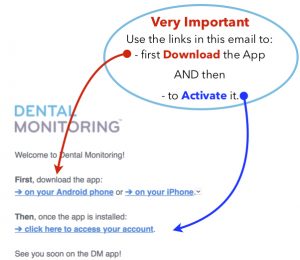
2. Download the DM App, place on the first page on your phone, activate, and follow the instructions.
3. Select the type of retractor that you are have been advised to use by Dr Manara. If you are unsure or have any questions please contact us.
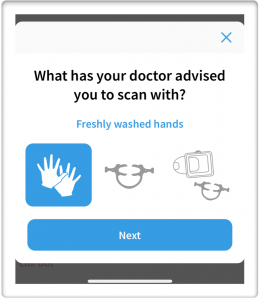
- Tips how to use fingers & spoon Click here
- Using Dental cheek retractors. They can be obtained online from various online providers. Click here on how to use them
- If you have been advised to buy a ‘Scan Box’ Click here
4. Take your video/ photographs and submit.
5. Dr Manara will contact you with his comments and suggestions via the DM App or with a telephone call if needed.
Further information to help you using Dental Monitoring
How to use the DM App
Please note that in this video the patient has been asked to use the ‘Scan Box’. Select your method at the start, whether using the ‘Finger method’, ‘Check retractors’ or the ‘Scan Box’.
Do’s & Don’ts when scanning your teeth using DM – Click here
How to use the ‘Scan Box’ with Aligners
How to use the ‘Scan Box’ Without Aligners
How to fit check retractors
How to take a video / photographs of your teeth – Asking someone else
How to take a video / photographs of your teeth – Yourself